Showing posts with label Biztalk. Show all posts

Tuesday, June 17, 2008

Watch out for that blank space

We have created a receive location with send port group as the subscriber and will send the message output using FILE adapter and FTP adapter.

Send Port Group

So yesterday, I got an email from the engineering site, they said that they were not able to process the file from the FTP drop. 

Then they sent this output to me :

$ cat FILEA.txt
cat: FILEA.txt: No such file or directory


But if they used this, the file is actually there :

$ more *
::::::::::::::
FILEA.txt
::::::::::::::
CONTENT FILE A


Another test :

$ more FILEA.txt*
CONTENT FILE A


So from the test results above, you probably know what’s the cause right? :P

See that in the target file name properties, there is a blank space behind the “txt”.

Target File Name

After removed the blank space, life is good again :D

Thursday, June 12, 2008

BizTalk MsgBoxViewer

While reading a post from One Blog for BizTalk Engineers, I found an interesting tool, BizTalk MsgBoxViewer, built by Jean-Pierre Auconie, which can be used to monitor and generate reports for BizTalk. You can see a little bit of background of the tool at here.

There are 2 user interfaces to use the tool, through GUI or console.

This is a screen capture for the GUI

BizTalk MsgBoxViewer

This is the screen capture for the consoleBizTalk MsgBoxViewer - Console

And here’s the generated report, I would say that I will need some time to chew the whole report out ;p

BizTalk MsgBoxViewer Report

Go and check it out for your self, it’s definitely worth to try, especially with the “limited” information that we can get by using the BizTalk Administration Console or Health and Activity Tracking :P

Microsoft BizTalk Server Performance Optimization Guide

For Biztalkers, you may want to spend a while to read the new Microsoft BizTalk Server Performance Optimization Guide white paper.

I found this while reading a post from Richard Seroter’s blog from my google reader feeds.

Thursday, May 29, 2008

BizTalk Wrong Message Type / Schema Routing Problem?

This morning, we saw that numbers of orchestrations were suspended.
After some investigations, we were quite surprised that the messages were sent to wrong orchestrations after being polled by the receive locations.

Below is how the messages should be routed based on the message type / schema subscription.


But what just happened to us was :


The data was polled correctly with the Database Alpha but later the message was constructed with the wrong message type / schema, which caused it to be delivered to the wrong orchestration :(


I have experienced this in the past with my testing box, however it only happened 1 time only and I can't think of at least a way to reproduce the problem.

And BTW, the "Restart the host instance" magic solution saved the day as usual :P

Tell me my dear readers, what i should say to my boss if he asks me about this? ;)

Friday, May 16, 2008

BizTalk SOAP Adapter - Consuming Remote Web Services Bottleneck

This morning I was told by my colleague that he found hundreds of instances running in the BizTalk Server and from the look of it, most of them are the send port SOAP adapter instances.

We have an orchestration which consumes a web services, so the first thing that came to my mind is that it's gotta be the web services which can not handle the load.

I was thinking that there's gotta be hundreds of concurrent calls to the web services, then i tried to open up the Performance Counter -> ASP.NET Apps v1.1.4322 -> Requests Executing for the particular web services, i was surprised to see that there are only 2 requests executing concurrently :|

Then my other colleage told me that there's a settings in the machine.config file for this, to limit the numbers of call to particular connection.

<system.net>
<connectionManagement>
<add address="*" maxconnection="2">
<add address = "http://www.contoso.com" maxconnection = "5" />
<add address = "http://www.northwind.com" maxconnection = "2" />
<add address = "200.200.200.1" maxconnection="12">
</connectionManagement>
</system.net>


After changing this settings to a higher value, the instances were getting completed gradually and not building up anymore :)

You can find more about this at :
http://channel9.msdn.com/wiki/default.aspx/PerformanceWiki.HowToTuneASPNET
http://support.microsoft.com/kb/821268
http://msdn.microsoft.com/en-us/library/aa560822.aspx / BizTalk 2006 Server Documentation -> SOAP Adapter Configuration and Tuning Parameters
http://msdn.microsoft.com/en-us/library/1tkaca2y.aspx

However, in the BizTalk 2006 Server Documentation, it states that the default is 20 where .Net Framework Documentation states only 2.

Hope this helps anyone with the same issue ;)

Wednesday, May 7, 2008

Setup Local FTP Server for BizTalk 2006 FTP Adapter Development

Today, I was asked by my colleague to find out more about BizTalk 2006 FTP Adapter, because we may use that for future projects.

Setup my local PC with Windows XP Professional SP 2

1. Windows XP comes with built in FTP Site under the IIS Installation, you can install them through Add or Remove Programs -> Add/Remove Windows Component.
You can follow the steps from Mark Salloway's post and Mike D.'s article for FTP overview.

2. Open Computer Management -> System Tools -> Local Users & Groups -> Users

3. Create a new local user named FTPUser with the password

4. Create a folder named BizAppFTP and several subfolders :

  • In -> Receive Location
  • Out -> Send Port
  • Log -> FTP Adapter Log Folder
  • Sample -> Contain sample files for input
Right click on the BizAppFTP Folder -> Properties -> Security Tab -> Add FTPUser into the list and allow modify access.

5. Open Computer Management -> Services and Application -> Internet Information Services -> FTP Sites -> Default FTP Site

6. Create a virtual directory named BizApp and set the path to the previously created BizAppFTP folder. Check Read, Write, and Log visits options for the virtual directory.

7. Open BizTalk Server 2006 Administration Console

8. Create a one-way receive port named rp_TestFTP and a receive location rl_TestFTP and configure the adapter
  • File Mask : *.xml
  • Folder : BizApp/In
  • Log : D:\Temp\BizAppFTP\Log\Receive.Log
  • Password : (Fill this with FTPUser password)
  • Server : (Your server name / IP Address)
  • User Name : FTPUser

9. Create a send port named sp_TestFTP and configure the adapter
  • Folder : BizApp/Out
  • Log : D:\Temp\BizAppFTP\Log\Send.log
  • Password : (Fill this with FTPUser password)
  • Server : (Your server name / IP Address)
  • User Name : FTPUser

10. Set the filter expression for the sp_TestFTP to subscribe the message from rp_TestFTP receive port.

Testing Time

1. Create a sample xml file in then sample folder with only inside.
2. Copy and paste the file into the "In" folder

3. Depends on the polling interval, it will pick up the file through rl_TestFTP and then send the file directly to the "Out" folder through sp_TestFTP.

4. The output file was generated and if you can see the Receive.Log and Send.Log for the FTP activities.
Similar to FILE adapter, the adapter will try to get the file and delete the file, this is why you will need to have a user who has privilege to delete the file and by using this built in FTP, the security can be configured through NTFS.

You may want to read more on the FTP Adapter in the BizTalk documentation, especially on the security part where it mentions "FTP is, by nature, not secure: The user name, password, and other credentials traverse the network in clear text".

I'll post more later when I have the project at hand.
Hope this helps :)

Tuesday, May 6, 2008

BizTalk Server 2006 Development with SQL Express 2005 - Job Agent Replacement

BizTalk Server 2006 can be installed with the SQL Express 2005 edition.

I'm currently using SQL Express 2005 for the development purpose because it is free so we don't have to worry about the licensing.

The downside of using SQL Express 2005 is that the job agent is not available anymore, where BizTalk has several clean up jobs which need to run to optimize the database performance.
Usually we don't have to worry about this since we're only using for development or testing purpose, but I'm currently investigating a problem with our singleton orchestration, we suspect that by using a singleton orchestration, some messages were cleaned up in the database after they are completed.

So how to investigate this problem in my local development PC where we don't have running biztalk clean up jobs in SQL Express 2005?
Luckly, I found this article which mentions about SQLScheduler.
It's free and we can have unlimited instances with unlimited jobs :)

I just tried to setup the jobs based on the jobs which were created in SQL Server Instances, and they seems to work fine because the stored procedures for the jobs were created in the SQL Express Database as well.

This is the job details example for MessageBox_Message_Cleanup_BizTalkMsgBoxDb :

Go and give it a try for yourself, it's more than enough for development / testing purpose :)

Wednesday, April 30, 2008

BizTalk 2006 Oracle Adapter (ODBC) - An alternative for Poll Statement with Function (Not Procedure)

In Oracle Adapter, there are several ways to poll the data from the database, in this post, I will be discussing on the polling data without triggers, just by using Poll SQL Statement and Post Poll SQL Statement.

Part 1 - The First Project
We have a table of data which will be polled by several orchestrations based on a status field in the table to process, see below screen for the details.

By using Poll SQL Statement to get the rows and Post SQL Statement to update the rows to other status is actually working fine for most of the cases, and it is important to note that they are both executed within a transaction of serializable isolation level.

In my first project, it is working fine, because the frequency is quite low, poll 1 row of data / 60 seconds. Life is good ;)

Part 2 - The Second Project
Ok, now in which kind of scenarios where it is not working as expected?

We have a new application which needs to poll rows of data in short interval, because the expected data to process will be huge, so it is not acceptable for us to poll 1 row / 60 seconds.
In short, we need to process 3.000 rows of data in 1 hour, so that leaves us with 50 rows / 60 seconds.

So what's the issue with that? just change the query to select top 50 and off you go? hhhmm... not as smooth as we thought :P

Reasons : As the processing got huge, it seems that the server and/or the adapter are affected as well. Because of the latency, it seems that the Post Poll SQL Statement is not executed in the expected time, this cause the subsequent polls may poll the same data as the previous one, because the Update the row status in the Post Poll SQL Statement hasn't been executed yet. This eventually lead to double processing of the data.

Part 3 - The Search for Alternatives
What is the ideal way for this? I would say that call a procedure to poll the data, because we can get the rows and update them in the same time. And btw, I don't really like the way Poll SQL Statement and Post SQL Statement work, we need to make sure that the conditions / where statements in the Poll SQL Statement and Post Poll SQL Statement are the same or we'll get nasty update results :P

Unfortunately, I have been trying for calling a procedure without any good results for quite a while now, and i have posted some questions about this in the web and they have been replicated to many places now :P links

Well, several people have mentioned that they are able to use oracle procedure to poll the data, however I haven't received more details about it until now.
http://forums.microsoft.com/TechNet/ShowPost.aspx?PostID=2527819&SiteID=17
http://www.microsoft.com/communities/newsgroups/en-us/default.aspx?dg=microsoft.public.biztalk.general&tid=97564c53-15ee-4a8e-997c-72f8c2520241

The main problem with oracle procedure, it will need an output parameter to return a resultset, and I was not able to think a way to work with this parameter in the Poll SQL Statement.

So several days ago, i stumbled on a post (I forgot where from) but someone from the post mentioned about using function in the select statement like this below :

Select packagename.functionname from dual;


This gave me an idea, because it will just like a normal select query which returns row(s).

So the next thing to do is to have the DML statement to update the selected rows, I found a way to allow DML Statement in the function, is to use PRAGMA AUTONOMOUS_TRANSACTION which will summon its own transaction so it will not affect the caller transaction.

Part 4 - The Solutions

Solution 1 - Get one row

1. Create an oracle function to select and update the row then return the unique key

CREATE OR REPLACE FUNCTION pollonejob RETURN NUMBER IS
PRAGMA AUTONOMOUS_TRANSACTION;
JOBID NUMBER;
BEGIN
SELECT JOB_ID
INTO JOBID
FROM JOBS
WHERE JOB_STATUS = 'NEW'
AND ROWNUM = 1 FOR UPDATE;

-- This is to test the lock only
--DBMS_LOCK.SLEEP(3);

UPDATE JOBS
SET JOB_STATUS = 'POLLED'
WHERE JOB_ID = JOBID;

COMMIT;

RETURN JOBID;
END;
/


2. Setup the Poll SQL Statement :
SELECT pollonejob AS JOBID FROM dual

Or, if you can do it like this to retrieve more information based on the key :
SELECT job_id, job_desc, job_status FROM jobs WHERE job_id = pollonejob

Solution 2 - Get more rows
1. Create an oracle type as the container for the unique keys
CREATE OR REPLACE TYPE number_key_t is TABLE OF NUMBER

2. Create an oracle function returning the previously created type with a parameter to speficy how many rows to retrieve
CREATE OR REPLACE FUNCTION pollmultiplejob(noOfRows NUMBER) RETURN NUMBER_KEY_T IS
PRAGMA AUTONOMOUS_TRANSACTION;
l_data NUMBER_KEY_T := NUMBER_KEY_T();
BEGIN
SELECT JOB_ID
BULK COLLECT
INTO l_data
FROM JOBS
WHERE JOB_STATUS = 'NEW'
AND ROWNUM <= noOfRows FOR UPDATE;

-- This is to test the locking only
--DBMS_LOCK.SLEEP(3);

UPDATE JOBS
SET JOB_STATUS = 'POLLED'
WHERE JOB_ID IN (SELECT column_value FROM TABLE(CAST(l_data AS NUMBER_KEY_T)));

COMMIT;

RETURN l_data;
END;
/


3. Setup the Poll SQL Statement :
SELECT column_value FROM TABLE(CAST(pollmultiplejob(20) AS NUMBER_KEY_T))

Or, if you can do it like this to retrieve more information based on the key :
SELECT job_id, job_desc, job_status
FROM jobs WHERE job_id IN (SELECT column_value FROM TABLE(CAST(pollmultiplejob(20) AS NUMBER_KEY_T)))

Notes :
1. You do not need the Post Poll SQL Statement anymore, since when the Poll SQL Statement is executed, the rows will be updated in the same time it polls
2. Avoid setting the poll interval less than the time to execute the polling query, for example if the polling takes 30 seconds to complete, it's better to set the poll interval 40 seconds or more, consider the future data growth
3. As the function will update the data when being called in the select query, please do handle that more carefully by giving more meaningful function name, so everyone will know that the function will not only retrieve the data but also update the rows in the same time.

I have tested this with one receive location for several days now and it seems that they are working fine as expected :)

I'm just glad that I have this workaround or you might say that this is a bit hack :P but it did solve my problem and work for Oracle Adapter with ODBC, and i hope it will be useful for you guys as well.

**Update** I have tried creating 5 receive locations calling the same function and there were no duplicate poll :D
However, there is a flaw, the FOR UPDATE statement may not work as expected when trying to poll the data sequentially where in oracle you will need to have a sub query like below :
SELECT JOB_ID
BULK COLLECT
INTO l_data
FROM JOBS
WHERE JOB_ID IN (
SELECT JOB_ID
FROM (
SELECT JOB_ID
FROM JOBS
WHERE JOB_STATUS = 'NEW'
ORDER BY JOB_ID
) A
WHERE ROWNUM <= 1
)
FOR UPDATE;

I experienced duplicate polls with this, so make sure you test your query first for any duplicate issue.

Feel free to drop any comments or questions ;)

Monday, April 28, 2008

Installation and setup files for BizTalk 2006 R2 with Oracle Adapter Pack 3 (Evaluation Edition)

I'm currently trying BizTalk 2006 R2 with the new BizTalk Oracle Adapter Pack 3.0 (ODP.Net) to resolve the locking issue we had with the previous Oracle Adapter version with ODBC.

You can grab the installation files from here :

  1. Oracle Data Access Component (ODAC)
  2. BizTalk Server 2006 R2 Evaluation Edition (Note: You will not be able to perform upgrade with the evaluation edition, you will need to uninstall the current BizTalk development edition first and then install the evaluation edition)
  3. WCF LOB Adapter SDK
  4. BizTalk Oracle Adapter Pack 3.0 (Oracle adapter included inside)
  5. BizTalk Adapter Pack: Oracle Database Adapter Samples

Thursday, March 13, 2008

BizTalk Deployment with MSBuild without Custom Task

In this post, I will be discussing more on BizTalk Deployment to production environment.

I just had a deployment yesterday, the scenario :
We have some bug fixes to some orchestrations which we need to apply to an existing BizTalk application in production.

I have been interested in automated BizTalk deployment since I read a post about Creating highly-repeatable builds and deployments from Brian Loesgen. However, Brian's post is about compilation and export of the application to MSI, and he's using a plain batch command file.
Later I found a post about Using MSBuild to Build and Deploy BizTalk 2006 Solutions from Stephen W. Thomas. The post is more relevant to my scenario, however I found that there are some custom tasks being used to perform the deployment.

I'm trying to make things simpler by using the existing tools because we have a quite strict policy for deployment and I hope with this, others can also use it without having to dig in into the custom tasks.

So based on both articles, I managed to come out with a set of MSBuild files for the deployment.

  1. Deploy.bat : Batch command file for the IT person to run the MSBuild with it parameters (project file & log file)
  2. Build.proj : Main project file which specifies all the steps (targets) to execute
  3. Build.properties : Definition of variables & collections for the deployment
  4. Deploy.targets : List of steps (targets) for the deployment
Grab the files from here :


Scenario :
  1. Stop BizTalk Host Instance
  2. Register Helper library to GAC
  3. Stop & Unenlist Orchestration
  4. Import MSI
  5. Install MSI
  6. Import Binding File
  7. Start & Enlist Orchestration
  8. Start BizTalk Host Instance
  9. Copy MyWebServices update files
Deploy.bat
@ECHO Starting up MS Build
C:\WINDOWS\Microsoft.NET\Framework\v2.0.50727\MSBuild.exe Build.proj /l:FileLogger,Microsoft.Build.Engine;logfile=Build.log;append=false;verbosity=diagnostic;encoding=utf-8
Build.proj
<Project xmlns="http://schemas.microsoft.com/developer/msbuild/2003" DefaultTargets="StopBizTalkServices;RegisterGAC;StopOrchestration;DeployMSI;InstallMSI;ImportBindingFile;StartOrchestration;StartBizTalkServices;DeployWS">
<Import Project="Build.properties" />
<Import Project="Deploy.targets" />
</Project>
Note: Specify the steps (targets) to execute at DefaultTargets attribute value

Build.properties
<Project xmlns="http://schemas.microsoft.com/developer/msbuild/2003">
<PropertyGroup>
<!-- Path to the .Net utilities (gacutil.exe) folder -->
<DotNetPath>C:\Program Files\Microsoft.NET\SDK\v2.0\Bin\</DotNetPath>
<!-- Path to the BizTalk folder -->
<BizTalkPath>C:\Program Files\Microsoft BizTalk Server 2006\</BizTalkPath>
<!-- Path to the deployment root folder -->
<DeploymentPath>C:\DeploymentFolder\</DeploymentPath>
<!-- Path to the Web Services Deployment path -->
<WSDestinationPath>C:\Inetpub\wwwwroot\MyWebServices\</WSDestinationPath>
<!-- Path to the build dll files -->
<GACPath>$(DeploymentPath)\Common Library\</GACPath>
<!-- Path to the msi files -->
<MSIPath>$(DeploymentPath)\MSI Files\</MSIPath>
<!-- Path to the binding files -->
<BindingPath>$(DeploymentPath)\Binding Files\</BindingPath>
<!-- Path to the WMI script files -->
<WMIScriptPath>$(DeploymentPath)\WMIScripts\</WMIScriptPath>
<!-- Name of the BizTalk Application to deploy code into -->
<BTApplicationName>MyBizApp</BTApplicationName>
<!-- Bts Log File -->
<BtsLogFile>BtsTask.log</BtsLogFile>
<!-- MsiExec Log File -->
<MsiLogFile>MsiExec.log</MsiLogFile>
</PropertyGroup>

<!-- List all .net items that need to be GACed -->
<ItemGroup>
<GacStuff Include="MyLibrary1.dll" />
<GacStuff Include="MyLibrary2.dll" />
</ItemGroup>
<!-- List all MSI Files -->
<ItemGroup>
<MSIFile Include="MyBizApp.msi" />
</ItemGroup>
<!-- List all affected BizTalk Services to restart -->
<ItemGroup>
<BizTalkServices Include="BizTalk Service BizTalk LOCAL : BizTalkServerApplication" />
</ItemGroup>
<!-- List all web services files to deploy -->
<ItemGroup>
<WSFiles Include="$(DeploymentPath)\MyWebServices\**\*.*" />
</ItemGroup>
</Project>
Note: I grouped the deployment files into certain folders to make it easier to understand :
  1. Common Library folder -> Consists of helper dlls which needs to be GAC-ed seperately
  2. MSI Files folder -> BizTalk generated MSI Files to import and to install
  3. Binding Files folder -> Binding Files to import
  4. WMIScripts folder -> Consists of vbs files to stop (StopOrch.vbs) & start (EnlistOrch.vbs) the orchestrations, you can find the vbs files under the C:\Program Files\Microsoft BizTalk Server 2006\SDK\Samples\Admin\WMI
  5. MyWebServices folder -> Consists of updates for the existing MyWebServices
Deploy.targets
<Project  xmlns="http://schemas.microsoft.com/developer/msbuild/2003">
<!-- START DEPLOYMENT -->

<!-- Stop BizTalk Services -->
<Target Name="StopBizTalkServices" >
<Exec Command="NET STOP "%(BizTalkServices.Identity)"" ContinueOnError="true" />
<Message text="Stopped BizTalk Services : %(BizTalkServices.Identity)" />
</Target>

<!-- Register GAC -->
<Target Name="RegisterGAC" >
<Exec Command=""$(DotNetPath)gacutil.exe" /i "$(GACPath)%(GacStuff.Identity)" /f" />
<Message text="Registered DLLs to GAC : %(GACStuff.Identity)" />
</Target>

<!-- Stop Orchestration : The process sequence matters because of the dependency -->
<Target Name="StopOrchestration" >
<Exec Command="cscript.exe $(WMIScriptPath)StopOrch.vbs [Orchestration name 1] [Assembly Name 1] Unenlist" />
<Exec Command="cscript.exe $(WMIScriptPath)StopOrch.vbs [Orchestration name 2] [Assembly Name 2] Unenlist" />

<Message text="Stopped and Unenlisted Orchestrations" />
</Target>

<!-- Deploy MSI -->
<Target Name="DeployMSI" >
<Exec Command=""$(BizTalkPath)BtsTask.exe" ImportApp /Package:"$(MSIPath)\%(MSIFile.Identity)" /ApplicationName:$(BTApplicationName) /Overwrite >> $(BtsLogFile)" />
<Message text="Deployed $(BTApplicationName)" />
</Target>

<!-- Install MSI in quite mode -->
<Target Name="InstallMSI" DependsOnTargets="DeployMSI">
<Exec Command="MsiExec.exe /i "$(MSIPath)\%(MSIFile.Identity)" /quiet /l+ $(MsiLogFile)" />
<Message text="Installed %(MSIFile.Identity)" />
</Target>

<!-- Import Binding File -->
<Target Name="ImportBindingFile" DependsOnTargets="DeployMSI">
<Exec Command=""$(BizTalkPath)BtsTask.exe" ImportBindings -Source:"$(BindingPath)$(BTApplicationName).BindingInfo.xml" -ApplicationName:$(BTApplicationName) >> $(BtsLogFile)" />
<Message text="Imported Binding for $(BTApplicationName)" />
</Target>

<!-- Start Orchestration : The process sequence matters because of the dependency -->
<Target Name="StartOrchestration" DependsOnTargets="DeployMSI;ImportBindingFile">
<Exec Command="cscript.exe $(WMIScriptPath)EnlistOrch.vbs [Orchestration Name 2] [Assembly Name 2] Start" />
<Exec Command="cscript.exe $(WMIScriptPath)EnlistOrch.vbs [Orchestration Name 1] [Assembly Name 1] Start" />

<Message text="Enlisted and Started Orchestrations" />
</Target>

<!-- Start BizTalk Services -->
<Target Name="StartBizTalkServices" DependsOnTargets="DeployMSI;ImportBindingFile;StopOrchestration">
<Exec Command="NET START "%(BizTalkServices.Identity)"" ContinueOnError="true" />
<Message text="Started BizTalk Services : %(BizTalkServices.Identity)" />
</Target>

<!-- Update the Web Services -->
<Target Name="DeployWS">
<Copy SourceFiles="@(WSFiles)" DestinationFiles="@(WSFiles->'$(WSDestinationPath)%(RecursiveDir)%(Filename)%(Extension)')" />
<Message text="Deployed Web Services" />
</Target>

<!-- END DEPLOYMENT -->
</Project>
Note: As you see above, I only use existing tasks such as exec and copy for the deployment and I use BtsTask.exe for BizTalk deployment. For the complete list of MS Build tasks, you can find it here.


After executing the deploy.bat, there will be 3 log files :
  1. Build.log -> MSBuild generated log file which contains all the deployment activities
  2. BtsTask.log -> BtsTask.exe generated log file for BizTalk deployment
  3. MsiExec.log -> MsiExec.exe generated log file for BizTalk Msi File installation
Notes:
  • GACUtil.exe may not be available in the server if the SDK is not installed, I did it manually using the Microsoft .NET Framework 2.0 Configuration yesterday.
  • cscript.exe will not have return success or fail to MSBuild so it will not stop when there is any error.
  • There is one tweak on the EnlistOrch.vbs, by default it will try to start and enlist the orchestration with the default host. Since I'm not using the default host for my application, i comment out the line 90 -> Inst.Enlist(HostName) and use only Inst.Enlist
  • I haven't tried yet, but the Build.properties and Deploy.target files should be able to be merged into the Build.proj itself, however by splitting them into 2 files, they are easier to maintain and understand as well.
Why bother ourselves to use MSBuild than to use plain batch command for this like Brian's post?
  1. MSBuild provide built-in file log mechanism for the whole execution process
  2. Better and clearer dependency specification between tasks
  3. MSBuild comes with .Net Framework 2.0 which means that every BizTalk server should have MSBuild installed without any additional installation efforts.
My wish list :
  1. MSBuild provides new Built-in task for GACUtil
  2. BizTalk Server provides add-on BizTalk tasks for MSBuild
Please leave questions or comments if you have any ;)
Hope this helps :)

Friday, February 29, 2008

Application (Message) Based Routing in BizTalk Orchestration

This may not be a common scenario, but a few weeks ago, I was given this requirement :

If a message comes from Application 1, please send it to Web Service A in Server X, if it comes from Application 2, please send it to Web Service A in Server Y, so on and so forth.


Notes : Web Services A is a same webservices deployed on both Server X and Server Y

What are the purposes of having this requirement?

  1. Development :
    • We have numbers of projects which may be developed in different development servers but for the BizTalk parts, they are all deployed in a single BizTalk Development box. When we're calling the a particular web services, it is possible that Project A will use Development Server A and Project B will use Development Server B.
  2. Production :
    • For Load management purpose, we can point Application 1 calls to Web Server A and other Application calls to Web Server B.

In BizTalk, we can do it this way below, however since Web Service A in Server X and Server Y are actually a same web services, BizTalk will not be able to process the messages because they will have same namespace and same schema information. Unless you want to use different pipelines for each send port, imagine if you have 10 or more applications, do you really want to create additional custom pipelines for each of them :P

To solve the namespace and schema issue, we can create a common orchestration which can be shared / called by the applications. But wait, there's only 1 send port can be defined in this solution, we still want Application 1 to call Web Services A in Server X and Application 2 to call Web Services A in Server Y.


Now, this is where Role Link comes to play. If you see the diagram below, between the Orchestration and the send ports, there is a Role Link Provider. This is just like an additional routing layer which we can use instead of correlating the orchestration and the send port directly.


How to use Role Link is quite similar to regular Send port, you may notice when clicking on the port surface, there is New Role Link option ;) and you will need to choose between Provider & Consumer which is basically to define whether you will be sending message through this port or receiving message through this port.


The next question will be how to route the message?
  1. We will need to have a value in the message to differentiate where this message comes from and should be routed into
  2. We define the destination party before we send the message, e.g :
    varDestinationPartyName = HelperClass.GetDestinationPartyName(partyName);
    send_port1(Microsoft.XLANGs.BaseTypes.DestinationParty) = new Microsoft.XLANGs.BaseTypes.Party(
    varDestinationPartyName,"OrganizationName");
  3. We create new Party with the Organization name that we define, e.g : Application 1, Application 2, etc.
  4. After deployed the orchestration, we should be able to find the provider we defined in the orchestration in the Role Links folder under Orchestrations folder (BizTalk Administration Console)
  5. Click on the provider to open the the window. In this window, we can bind the party and the send ports. For illustration :
    • Party : Application 1, Logical Port : send_port1, Physical Port : sp_WSA_ServerX
    • Party : Application 2, Logical Port : send_port1, Physical Port : sp_WSA_ServerY
    • Party : Default, Logical Port : send_port1, Physical Port : sp_WSA_ServerY
Notes : I provide a default party as well, so in case if i have a new application 3 and i haven't added it to the party list, it will use the default party :)

How to check whether the party exists?

public static string GetDestinationPartyName(string partyName)
{
string result = Constant.DefaultDestinationPartyName;
BtsCatalogExplorer catalog = null;

try
{
// Create the root object and set the connection string
catalog = new BtsCatalogExplorer();
catalog.ConnectionString = ConfigurationHelper.BizTalkMgmtDBConnectionString;

// Get the requested party from the collection
Microsoft.BizTalk.ExplorerOM.Party party = catalog.Parties[applicationUserID];

if (party == null)
{
//Log as warning that the party could not be found
}
else
{
result = party.Name;
}
}
catch (Exception ex)
{
//Log the exception
}
finally
{
if (catalog != null)
catalog.Dispose();
}

return result;
}


Notes : Party List is not available at WMI

If you're getting this exception "Microsoft.BizTalk.ExplorerOM.BtsException: The database or the database version is incompatible with the installed version of this product.", you can just use sql objects to retrieve the party name from database instead of using the BizTalkCatalogExplorer :

cmd = new SqlCommand("select nvcName from bts_party where nvcName = @partyname", cn);
SqlParameter prmPartyName = new SqlParameter("@partyname", applicationUserID);
cmd.Parameters.Add(prmPartyName);


Hopefully, this interests you as it is for me ;)

Tuesday, February 26, 2008

Date Serialization Issue (GMT) in BizTalk Orchestration?

I just posted a question in the microsoft.public.biztalk.orchestration a few minutes ago.

I found Paul's post and Nigel's post in the net related about this date problem as well, someone mentioned that this is a .Net Serialization for DateTime. But the thing that i have yet to understand, why this only happens in BizTalk Orchestration? When the message is sent to the web services, it is also serialized right?

Nigel's solution is to handle the time offset difference in the Orchestration by ourselves, but is this a right way to do? What I'm afraid of is that if i follow this now, what if later in future, the date serialization is suddenly working fine (because of hotfix or whatever) then i find my self with bunch of wrong dates again :P

For the time being, we decided that we will pass the date in string format where we already have a current standard string format to follow. Why? Because currently this is not the only problem that we have, we're also having a different DateTime behavior with Oracle Adapter in Development and Production server aarrgghhh :(

I'll update this post with the solution when i find what, why, and how ;)
If you do have any existing solution, please let me know.

Problem :
Date becomes GMT in the BizTalk orchestration which cause wrong results (input <> output)

Scenario :
Web Application <-> Exposed Web Services By BizTalk Orchestration <-> BizTalk Orchestration <-> Consume Another Web Services

<-> : Request - Response communication.

BizTalk Orchestration will construct a message to consume another web services based on the request information from web application

Below message will be passed all the way in the process :
Note : DateInfo = xs:datetime, DateOnly = xs:date

Request Message :
<request xsi="http://www.w3.org/2001/XMLSchema-instance" xsd="http://www.w3.org/2001/XMLSchema" xmlns="http://MyBizTalkApp.Response">
<message>Calling BizTalk Web Services at 2/26/2008 1:35:47 PM</message>
<dateinfo>2008-02-26T13:35:47.1828125+08:00</dateinfo>
<dateonly>2008-02-26</dateonly>
</request>

Web Service Message :
message : <string>Calling BizTalk Web Services at 2/26/2008 1:35:47 PM</string>
dateInfo : <datetime>2008-02-26T05:35:47.1828125Z</datetime>
dateOnly : <datetime>2008-02-25T16:00:00Z</datetime>

Trace Results :
WebApplication: DateInfo : 2008-02-26T13:35:47.1828125+08:00
WebApplication: DateOnly : 2008-02-26T13:35:47.1828125+08:00

ExposedWebServices: DateInfo : 2008-02-26T13:35:47.1828125+08:00
ExposedWebServices: DateOnly : 2008-02-26T00:00:00.0000000

BizTalkOrchestration: Request DateInfo : 2/26/2008 5:35:47 AM -> Date becomes GMT
BizTalkOrchestration: Request DateOnly : 2/25/2008 4:00:00 PM -> Date becomes GMT
BizTalkOrchestration: ConsumedWS Request DateInfo : 2008-02-26T05:35:47.1828125Z -> Get From Request DateInfo
BizTalkOrchestration: ConsumedWS Request DateOnly : 2008-02-25T16:00:00.0000000Z -> Get From Request DateOnly

ConsumedWebServices: DateInfo : 2008-02-26T05:35:47.1828125Z
ConsumedWebServices: DateOnly : 2008-02-25T16:00:00.0000000Z

Monday, February 4, 2008

Microsoft.XLANGs.Core.UnexpectedMessageTypeException: Received unexpected message type '' does not match expected type

Just drop a quick note on this.

If you ever find this BizTalk exception where you so sure that you didn't change anything and it just happens after you deploy your orchestration :
Check your pipeline settings in your send port, it might have changed into PassThruTransmit/PassThruReceive instead of XmlTransmit/XmlReceive.

Not sure why it's changed, but this sometime happens after re-deploying orchestration.

Another 2 hours wasted because of this :(

BizTalk Oracle Database Adapter First Load Performance

I found this performance problem with BizTalk Oracle DB Adapter a month ago when developing some orchestrations using this adapter.

When re-deploying my solution and restarting the host instances, i need to wait about 15 - 20 minutes, you can imagine how difficult to wait that long, especially after only changing one or two lines of code then re-deploying the codes for testing.

After doing some investigations and tracing the process, i found that actually BizTalk itself was loading very quickly, but it stopped at the send port to the Oracle DB. My orchestration receives messages from web services and inserts information to the oracle database.
Then i traced the database process and finally i found these results below :


SELECT /*+ RULE */ '', a.owner, decode (b.object_type, 'PACKAGE', CONCAT( CONCAT (b.object_name, '.'), a.object_name), b.object_name),decode(a.position, 0, 'RETURN_VALUE', a.argument_name), decode(a.position, 0, 5, decode(a.in_out, 'IN', 1, 'IN/OUT', 2, 'OUT', 4)), 0, a.data_type, a.data_precision, a.data_length, a.data_scale, a.radix, 2, '' , '', 0, 0, '', a.position, '' FROM ALL_ARGUMENTS a, ALL_OBJECTS b WHERE ( b.object_type = 'PROCEDURE' OR b.object_type = 'FUNCTION' ) AND b.object_id = a.object_id AND a.data_level = 0 AND a.OBJECT_NAME LIKE '[Procedure / Function name]' ESCAPE '\' AND b.OWNER = '[User Account]' ORDER BY 2,3, a.overload, 18

When loading the send port, BizTalk will try to load all the oracle procedures & functions schema information which are accessible by the specified database user account in the send port. The user account which i was using has access to all 2000+ procedures the current database where i'm actually only using less than 20 of them :(

Moral of the story :
Use or create a specific application user account which only has access to the required oracle procedures in the send port.

Below is the sql query and please note that you will need to have access to the v$sql to run this :

Select sql_text, module, first_load_time, last_load_time, users_opening, users_executing
From v$SQL
Where last_load_time != ' '
AND Upper(MODULE) = 'RUNTIMEAGENT.EXE'
Order By last_load_time DESC;

Thursday, January 24, 2008

BizTalk Server 2006 Documenter

While browsing my feeds through google reader, I found a post from Brian Loesgen, he posted a lot of very useful links related to BizTalk. If you're a BizTalk developer, i really really encourage u to take a look at it ;)

One of the link which interest me is the BizTalk Server 2006 Documenter, because I'm currently doing some documentations for the recent BizTalk applications which we just have completed.
From the release date, it seems that this tool has been a while actually, but hopefully it will be helpful for you guyz who are just like me ;)

This is a direct link to the codeplex site.

The result is really really awesome, you can find the whole information that you can see while you're designing the orchestration, such as : Messages, variables, even the orchestration design (Gosh, just thinking how much efforts i did previously to put them in the my own documentation) and the information in the BizTalk server, such as : applications, orchestrations, ports, assemblies, schemas, etc.

Orchestration Information


Orchestration Design (This really rocks)


Orchestration Codes


Note :
  • The Ports information will not have the detail properties for the adapters (SOAP Address, OracleDB, Properties)
  • If you ever find this exception "There was an error generating the XML document" when generating the documentation, you might want to enable the error logging in the config file to dump the error stack trace to the log file. See whether this solution can solve the problem like it solved mine.
Documentation has never been as easy as this before ;)

Once again thanks a lot to the BizTalk Server 2006 Documenter Team.

Hope this helps :D

Friday, January 11, 2008

BizTalk Oracle Adapter / ADO.Net Limitation (ORA-01460: unimplemented or unreasonable conversion requested)

System defined exception
Call to RP_BIZTALKTEST@OracleDb://ORADEV/DBO/Procedures/TopLevel
Implementation = OracleDb://ORADEV/DBO/Procedures/TopLevel

Source: OracleDb
Error Code: 1460 (0x5b4)
Cause: OracleDb://exception=DBException (Unique ID )
42000 : [Oracle][ODBC][Ora]ORA-01460: unimplemented or unreasonable conversion requested


Exception data:
struct DBException =
WideString StatusCode = "42000"
WideString Description = "[Oracle][ODBC][Ora]ORA-01460: unimplemented or unreasonable conversion requested"


I'm using BizTalk 2006 with BizTalk Oracle Adapter to Oracle9i Database.

What i was trying to do here is to call an oracle procedure to insert a new row in a table and one of the field is CLOB/XMLType. This field is actually storing the current message which was passed in to the orchestration and to be used in future processing (other orchestration).

For simple / small size message, it was working fine as expected. Fortunately, I did try the scenario for huge incoming message (always test your code with the highest value of the assumptions (e.g. The user will be able to submit 1000 items in 1 transaction). Then I got this exception from BizTalk.

I tried to search through the net about this, it seems there is a limitation to pass in a parameter more than 32 KB size. (http://www.google.com/search?hl=en&q=32+kb+xmltype+parameter+procedure+limit&btnG=Search&meta=)

Some Tests which I did :
1. Use NativeSQL insert into table. - Not Working
XMLType column will be generated as base64binary type in the schema.
I have tried to pass the xml raw string but failed. Same if I tried to convert the xml into base64binary.
The error message which was returned :

System defined exception
Call to Insert@OracleDb://ORADEV/DBO/Tables/BIZTALKTEST
Implementation = OracleDb://ORADEV/DBO/Tables/BIZTALKTEST

Source: OracleDb
Error Code: 932 (0x3a4)
Cause: OracleDb://exception=DBException (Unique ID )
HY000 : [Oracle][ODBC][Ora]ORA-00932: inconsistent datatypes: expected NUMBER got BINARY


Exception data:
struct DBException =
WideString StatusCode = "HY000"
WideString Description = "[Oracle][ODBC][Ora]ORA-00932: inconsistent datatypes: expected NUMBER got BINARY
"


Or (I tried some combinations for the data type : CLOB/XMLTYPE)

Error transmitting message: SOAP-ENV:ServerRequest ID: Unknown
Exception Type: A cross object system conversion error occurred
Exception Info:
Exception occurred:
E-CORE0053: Dimensions or bounds of source and target params do not match
Call to Insert@OracleDb://ORADEV/DBO/Tables/BIZTALKTEST
Implementation = OracleDb://ORADEV/DBO/Tables/BIZTALKTEST

SOAP://xmlns/schemas.microsoft.com/BIZTALKTEST/InsertRecord:Type/[]/TESTRAW ==> OracleDb://ORADEV/DBO/Tables/BIZTALKTEST/InsertRecord/VARCHAR2/WideString
(SOAP://xmlns/schemas.microsoft.com/BIZTALKTEST/Insert:Element/Rows ==> sequence<struct OracleDb://ORADEV/DBO/Tables/BIZTALKTEST/InsertRecord&>)
(Error occurred before call to foreign method)


2. Call oracle Procedure passing XMLTYPE parameter - Not Working
I tried to use XMLType as a parameter but there was an error similar to the 2nd error above.

Error transmitting message: SOAP-ENV:ServerRequest ID: Unknown
Exception Type: A cross object system conversion error occurred
Exception Info:
Exception occurred:
E-CORE0053: Dimensions or bounds of source and target params do not match
Call to RP_BIZTALKTEST@OracleDb://ORADEV/DBO/Procedures/TopLevel
Implementation = OracleDb://ORADEV/DBO/Procedures/TopLevel

SOAP://xmlns/schemas.microsoft.com/TopLevel/RP_BIZTALKTEST:Element/V_TESTRAW ==> OracleDb://ORADEV/UNDEFINED_2000/WideString
(SOAP://xmlns/schemas.microsoft.com/TopLevel/RP_BIZTALKTEST:Element/V_TESTRAW ==> OracleDb://ORADEV/UNDEFINED_2000)
(Error occurred before call to foreign method)


3. Call oracle Procedure passing CLOB parameter and then convert into XMLTYPE when insert - Not Working
This is the one that actually has 32KB limitation. I actually created a small .net application using oracle client to test this and turned out that I got the same error when i tried to pass > 32 KB string into the parameter. There is a work around in this article, but i find it more complex than the 4th solution below (http://msdn2.microsoft.com/en-us/library/cydxhzhz(VS.80).aspx)

System defined exception
Call to RP_BIZTALKTEST@OracleDb://ORADEV/DBO/Procedures/TopLevel
Implementation = OracleDb://ORADEV/DBO/Procedures/TopLevel

Source: OracleDb
Error Code: 1460 (0x5b4)
Cause: OracleDb://exception=DBException (Unique ID )
42000 : [Oracle][ODBC][Ora]ORA-01460: unimplemented or unreasonable conversion requested


Exception data:
struct DBException =
WideString StatusCode = "42000"
WideString Description = "[Oracle][ODBC][Ora]ORA-01460: unimplemented or unreasonable conversion requested"


4. Use Oracle Data Provider for .NET 9.2.0.7.00 (ODP.Net) - Working
I found that this is actually the solution and the easiest way to do, passing a XMLTYPE is just as simple as passing other parameters, It has its OracleDb Type.XmlType. So far I have tested with huge messages more than 32 KB and they are working fine. Please also note on the ODP.Net version.

OracleParameter pContent = new OracleParameter("content", OracleDbType.XmlType, content.Length);

Before I decided to go with the ODP.Net, I have tried using :
1. ODBC Connection (System.Data.Odbc) : Limited with 4 KB size
2. .Net Oracle Data Provider (System.Data.OracleClient) : Limited with 32 KB size as well.

Thursday, January 10, 2008

BizTalk Consume WebServices with SOAP Header

When working with Web Services, the common scenario is to pass in the credential in the SOAP Header.

In this post, I will provide the steps how to do this in BizTalk Orchestration.
This will be a simple flow like below screen shot :

Flow Detail :

  1. Web Application will call an exposed web services by Biztalk Orchestration
  2. The request object consists of 3 elements : UserName, Password, Message
  3. BizTalk Orchestration will construct the SOAP Header Message with UserName and Password
  4. BizTalk Orchestration will assign the Message as the body and assign the SOAP Header
  5. BizTalk Orchestration calls the Web Services (WSSOAPHeader)
  6. Web Services will read the SOAP Header message and return back some message
  7. BizTalk will also return back the message to the web application

BizTalk Orchestration layout

One of the most crucial thing in here is the SOAP Header message.
To create the SOAP Header message schema :
  1. Create a property schema file
  2. In the schema properties, change the Target Namespace to http://schemas.microsoft.com/BizTalk/2003/SOAPHeader Set the Node Name property to the SOAP Header Name and the Property Schema Base to MessageContextPropertyBase
After creating this property, we can assign the SOAP Header into the message like this below

varXMLSOAPHeader = msgSOAPHeader;
msgWSRequest(MyBizTalkApp.AuthenticationSOAPHeader) = varXMLSOAPHeader.OuterXml;


Note :
  • When assigning the SOAP Header, it expects string value, that's why I assign the msgSOAPHeader into an XML document variable and get the string from OuterXml property.
  • If the SOAP Header is not received by the web services even though you have assigned it in the code, make sure that you have followed each of the steps to create the SOAP Header message schema above, especially the namespace part. It caused me 2 days to notice this one in the end :P
You can find and download the whole VS 2005 solution at here :


Here is the link to the MSDN Site : Consuming Web Services with SOAP Headers

Hope this helps

Friday, January 4, 2008

SSODB Configuration Store for BizTalk Orchestration

One of the aspect of the application design is the configuration module.

There are at least 4 repositories where we can store the configuration for BizTalk orchestration :

  1. Custom config file
  2. BizTalk config file
  3. Windows Registry
  4. Database
Since each company will have its own policy for the production environment, this will eventually lead into the configuration repository.

Each repository above has its own pros and cons to implement, but I would say that configuration files and registry will not scale for MultiServer / Clustering environment, since we need to replicate them to each of the BizTalk server. So it will be easier to use database since we can put the configuration information in one place and all the servers will access this central database.

But when it comes to the database, we will have the next question of where to store the connection string. Well, this is the point where SSODB comes in handy.

As we may notice, whenever we install BizTalk Server, the Enterprise Single Sign-on will need to be installed as well, and the Enterprise Single Sign-on has a database, named SSODB. This is mainly used for BizTalk to store all the internal configuration information.

This SSODB will be the ideal solution for the configuration repository since as far as i know.
Benefits :
  1. SSO will be installed and running along with BizTalk server
  2. It provides encryption
  3. It provides a central configuration repository for multi server environment
Microsoft also provide a sample of how to use the SSO as configuration Store (http://go.microsoft.com/fwlink/?LinkId=99741)

How to configure our application configuration in SSODB
The SSO Installation comes some executable files in folder at C:\Program Files\Common Files\Enterprise Single Sign-On.
The executable which we're going to use is ssomanage.exe
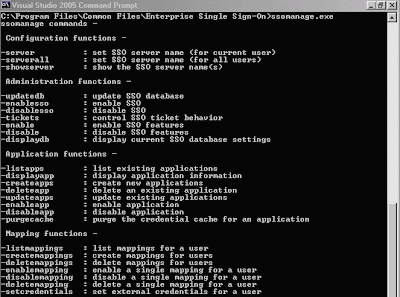
As you can see in the screen shot above, there are some paramaters we can pass into the ssomanage.exe.

To create our custom application configuration :
1. Define our custom application configuration definition xml (below)
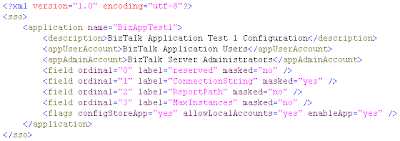
Note :
- When defining the fields, notice that the 1st field (ordinal=0) is a reserved field, so do not define any of your field in here, start defining our custom fields from the 2nd field (ordinal=1) afterwards.
- Use masked=true attribute to fields which need more security.

2. Save into xml file, e.g. BizAppTest1.xml

3. Run ssomanage.exe -createapps BizAppTest1.xml4. Go to C:\Program Files\Microsoft BizTalk Server 2006\SDK\Scenarios\Common\SSOApplicationConfig

5. Run Setup.bat to compile the tool, the executables should be generated in the bin folder (BTSScnSSOApplicationConfig.exe)

6. Use this tool to define our fields value :
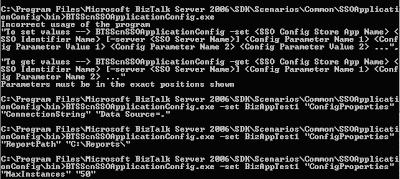
Example :
BTSScnSSOApplicationConfig.exe -set BizAppTest1 "ConfigProperties" "ConnectionString" "Data Source=."

Note : Use "ConfigProperties" for the SSOIndentifierName parameter

7. Verify whether the value is correct
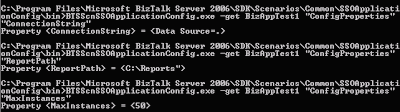
Example :
BTSScnSSOApplicationConfig.exe -get BizAppTest1 "ConfigProperties" "MaxInstances"

Richard Seroter has created his own awesome SSO Config Store Application Manager as window client tool to do the configuration in SSODB. You may want to take a look at it and try it yourself. He also has a lot of great biztalk posts and bits ;)

Note : If you have any additional fields or you want to remove the fields from SSO, the only way i know right now is to delete the app (ssomanage.exe -deleteapp BizAppTest1) and then re-do all the steps to setup the configuration. I created some script in a batch file so it will be much easier to do and can be re-used for deployment to production as well.

How to retrieve the configuration from SSODB
Fear not, when we install the enterprise single-sign on, there is an installed interface component which will provide the functionality to access the SSODB database, so we don't need to take care about how and where to connect to the SSODB database.

After you download the BizTalk Sample file for SSO As configuration store http://go.microsoft.com/fwlink/?LinkId=99741, there is a utility cs file, named SSOConfigHelper.cs. You can either include this class or the dll into your project.

Then we can retrieve our custom configuration value by calling this static method from the SSOConfigHelper class :

Microsoft.SSO.Utility.SSOConfigHelper.Read("BizAppTest1", "ConnectionString");


Hope this helps :)